
For most travelers, using Frontier Airlines Manage Booking online is faster and cheaper.
The Frontier Airlines Manage Booking portal allows travelers to access and modify reservations after booking.
Quick Answer: What Can You Do Through Frontier Airlines Manage Booking?
Using the My Trips section, passengers can:
- Change flights
- Cancel reservations
- Add carry-on or checked bags
- Select seats
- Check in online
- Access boarding passes
- Apply travel credits
- Review trip details
How to Access Frontier Airlines Manage Booking
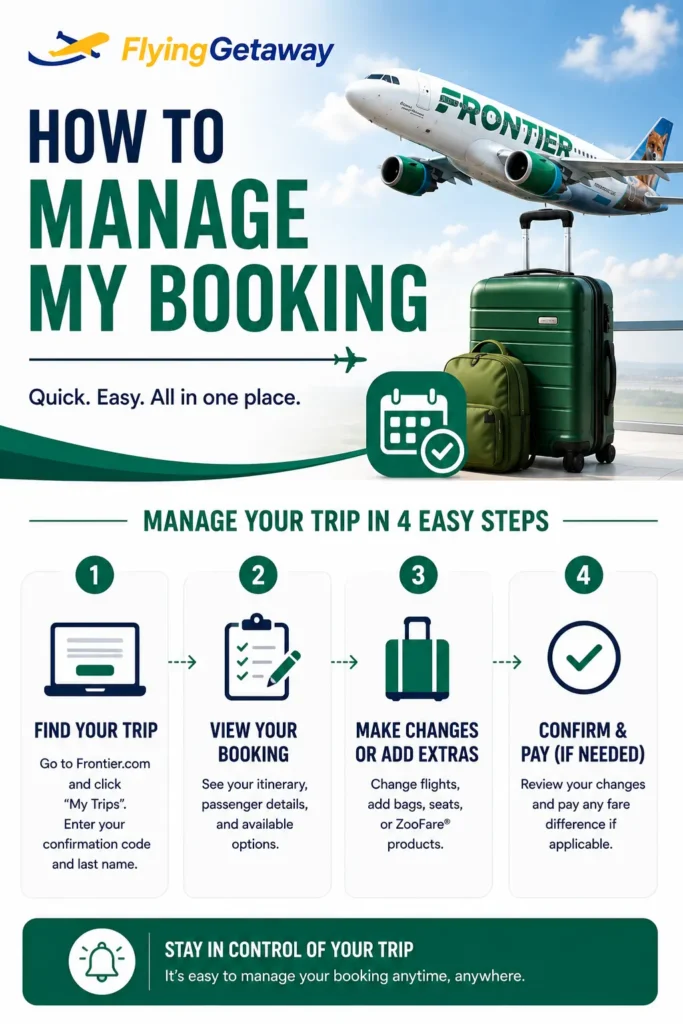
If you need to make changes to a Frontier reservation, start by accessing the My Trips section.
Steps to Retrieve Your Booking
- Visit FrontierAirlines.com.
- Select My Trips.
- Enter your:
- Confirmation code
- Last name
- Open your reservation.
- Choose the action you want to perform.
Once logged in, you’ll be able to manage nearly every aspect of your booking. Call Flying Getaway at our phone for assistance with flight bookings and airline cheap deals.
What Can You Do Through Frontier Airlines Manage Booking?
The portal allows travelers to control their reservation without needing to call Frontier.
Available Features
- ✔ Change flights
- ✔ Cancel bookings
- ✔ Add baggage
- ✔ Purchase seats
- ✔ Check in
- ✔ Access boarding passes
- ✔ Use travel credits
- ✔ View itinerary details
Most changes can be completed in minutes.
How to Change a Frontier Flight
One of the most common reasons travelers use Frontier Airlines Manage Booking is to change a flight.
Can You Change a Frontier Flight Online?
Yes.
Passengers can modify:
- Travel dates
- Flight times
- Return flights
- Itinerary details
Steps to Change a Flight
- Open My Trips.
- Select your reservation.
- Click Change Flight.
- Choose a new itinerary.
- Review fare differences.
- Confirm the update.
FlyingTip
Before changing your flight, compare multiple travel dates. A one-day shift can sometimes save more than the original ticket price.
Need detailed information about change costs? Read our complete Frontier Airlines Flight Change Policy guide.
How to Cancel a Frontier Reservation
Travel plans don’t always go as expected. Fortunately, Frontier allows eligible travelers to cancel reservations online.
Steps to Cancel
- Access My Trips.
- Open your reservation.
- Select Cancel Flight.
- Review cancellation options.
- Confirm the cancellation.
Depending on your fare type, you may receive:
- Travel credits
- Refund eligibility
- Future flight value
Thinking about canceling? Read our complete Frontier Airlines Cancellation Policy guide before making your decision.
How to Add Bags After Booking
Many travelers book flights first and add baggage later.
Can I Add Bags After Booking?
Yes.
You can purchase:
- Carry-on bags
- Checked baggage
- Additional checked bags
through Frontier Airlines Manage Booking.
Why Add Bags Early?
Bag prices are usually:
- Lowest during booking
- Higher after booking
- Highest at the airport
FlyingTip: Adding baggage immediately after booking is often significantly cheaper than waiting until check-in day.
Frontier Seat Selection After Booking
Frontier allows passengers to choose seats before departure.
Available Options
- Standard seats
- Preferred seats
- Stretch seating
- Family seating options
Selecting seats early improves your chances of sitting together when traveling with family or friends.
Online Check-In & Boarding Pass
Another popular feature inside Frontier Airlines Manage Booking is online check-in.
What You Can Do
- ✔ Check in online
- ✔ Download boarding passes
- ✔ Confirm baggage purchases
- ✔ Review seat assignments
- ✔ Verify flight information
Checking in before arriving at the airport can save time and help avoid additional airport fees.
How to Use Frontier Travel Credits
Travel credits can usually be applied during the booking process.
Common Sources of Travel Credits
- Flight cancellations
- Schedule changes
- Reservation modifications
Before using credits, verify:
- Expiration dates
- Passenger eligibility
- Applicable routes
Travel credits often expire if not used within the permitted timeframe.
Can You Change Passenger Information?
Certain passenger information can be updated through Frontier Airlines Manage Booking.
Depending on the situation, travelers may be able to:
- Correct contact information
- Update email addresses
- Adjust phone numbers
Name corrections and major passenger changes may require additional verification.
Frontier Airlines Manage Booking vs Airport Changes
| Action | Online | Airport |
| Flight Changes | ✔ | ✔ |
| Add Bags | ✔ | ✔ |
| Seat Selection | ✔ | ✔ |
| Check-In | ✔ | ✔ |
| Boarding Pass | ✔ | ✔ |
| Lowest Cost | ✔ | ✖ |
In most situations, managing your reservation online is faster and less expensive than making changes at the airport.
How to Avoid Extra Fees When Managing Your Booking
Make Changes Early
Earlier changes usually provide more options and lower costs.
Add Bags Online
Airport baggage fees are typically higher.
Review Fare Rules Before Modifying
Understanding fare conditions helps avoid surprises.
Monitor Schedule Changes
Airline schedule changes can sometimes create opportunities for free modifications.
Final Thoughts
The Frontier Airlines Manage Booking portal is one of the most useful tools available to travellers after booking a flight.
Whether you need to change travel dates, add baggage, select seats, cancel a reservation, or download your boarding pass, most actions can be completed online in just a few minutes.
Managing your reservation early often results in lower fees, better flight options, and a smoother travel experience.
Need help with a Frontier booking?
📞 Call Flying Getaway at our phone for assistance with flight changes, cancellations, travel credits, baggage purchases, and reservation management.
FAQs
How do I access Frontier Airlines Manage Booking?
Visit FrontierAirlines.com, select My Trips, and enter your confirmation code and last name to access your reservation.
Can I change a Frontier flight after booking?
Yes. Travelers can modify flights online through Frontier Airlines Manage Booking. Fare differences may apply.
Can I cancel a Frontier reservation online?
Yes. Eligible reservations can be cancelled through the My Trips section before departure.
How do I add baggage after booking?
Open your reservation through Frontier Airlines Manage Booking and select Add Bags to purchase carry-on or checked baggage.
Can I select seats after booking a Frontier flight?
Yes. Seat selection and upgrades can be completed through the Manage Booking portal before departure.
Can I check in online with Frontier Airlines?
Yes. Travellers can check in online, access boarding passes, and review reservation details before arriving at the airport. We at can help with rebooking, flight changes and name changes call us at our phone.
How do I use Frontier travel credits?
Travel credits can generally be applied during a future booking. Always review expiration dates and usage restrictions before redeeming them.
Is it cheaper to manage a Frontier booking online?
Yes. Online changes and baggage purchases are usually less expensive than making them at the airport. Call us at our phone to book our best deals with frontier airlines at cheap rates.

Patrick Walker is the travel brain behind Flying Getaway. With a knack for spotting flight deals and a passion for exploring new skies, he helps travelers fly smarter and save more with every trip.