

Quick Answer: How Do You Manage a Cayman Airways Booking?
You can manage a Cayman Airways booking online through the airline’s Manage My Bookings section. Use your booking details to view your itinerary, check flight status, access web check-in, review baggage rules, and manage eligible trip options before departure. If your ticket was booked through a travel agency, some changes may need to be handled by the original booking provider.
What Is Cayman Airways Manage Booking?
Cayman Airways Manage Booking is the online trip tool that helps passengers access an existing reservation before travel.
It is useful when you need to:
- View your itinerary
- Check flight details
- Review baggage information
- Access web check-in
- Check flight status
- Confirm terminal information
- Review connecting flight details
- Manage eligible booking updates
- Get help before airport arrival
Cayman Airways operates flights between the Cayman Islands, the United States, the Caribbean, and Central America, so checking your booking early is important, especially if your trip includes connections or island-hopping.
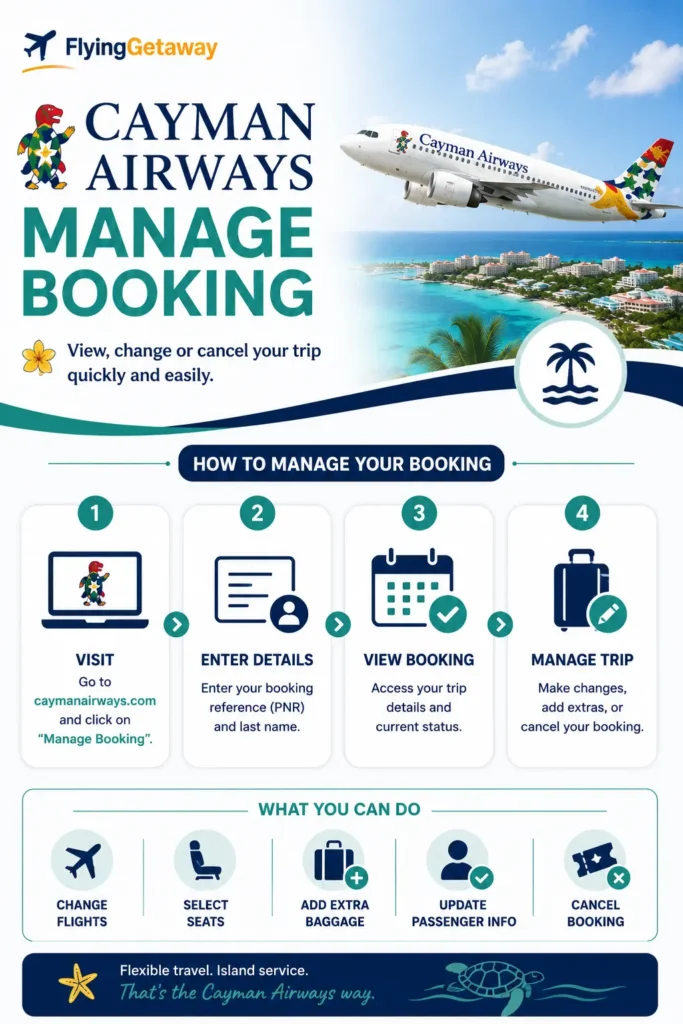
How to Access Cayman Airways Manage Booking
You can access your Cayman Airways reservation in a few steps.
- Visit the official Cayman Airways website.
- Select Manage My Bookings.
- Enter your booking reference and passenger details.
- Open your reservation.
- Review your trip information.
- Select the available service you need.
- Confirm any eligible update before departure.
Keep your confirmation email saved until your trip is complete. Your booking reference is the easiest way to find your reservation, check flight status, or access web check-in.
FlyingTip: Do not wait until airport arrival to review your Cayman Airways booking. If your route includes Cayman Brac, Little Cayman, Miami, Tampa, New York, Kingston, Havana, or Panama, check your itinerary early because schedules and connection timing can matter.
What Can You Do Through Cayman Airways Manage Booking?
| Service | Can You Use It Online? |
|---|---|
| View itinerary | Yes |
| Access Manage My Bookings | Yes |
| Check flight status | Yes |
| Use web check-in | Yes, where available |
| Review baggage policy | Yes |
| Check terminal information | Yes |
| Review connecting flight details | Yes |
| Manage eligible changes | Depends on fare and booking source |
| Get customer care support | Yes |
Not every booking will show the same options. Your available services may depend on your fare type, route, ticket conditions, and whether the ticket was booked directly with Cayman Airways or through a third-party agency.
Can You Change a Cayman Airways Flight Online?
You may be able to review or request eligible flight changes through Cayman Airways Manage Booking, depending on your fare rules and ticket conditions.
Before changing your flight, check:
- Whether your fare allows changes
- Whether a fare difference applies
- Whether the new flight has seats available
- Whether your connecting flights are affected
- Whether your ticket was issued by Cayman Airways or an agency
If the new flight costs more, you may need to pay the fare difference. If the booking was made through a travel agency, the agency may need to process the change.
Need help comparing change options? Call Flying Getaway at +1 (646) 814-6001 before confirming anything.
Can You Cancel a Cayman Airways Booking?
Cancellation options depend on your fare rules, route, and booking source.
You may have different outcomes depending on whether:
- You cancel voluntarily
- Cayman Airways cancels or changes the flight
- Your fare is refundable
- Your ticket allows credit
- Your booking was made through a travel agency
If Cayman Airways cancels your flight or makes a major schedule change, refund or re-accommodation options may apply depending on the situation and ticket rules.
Can You Check In Through Cayman Airways Manage Booking?
Yes. Cayman Airways provides web check-in access from its official website.
During check-in, travelers may be able to:
- Confirm passenger details
- Review flight information
- Access boarding pass options
- Check required travel documents
- Confirm baggage needs before airport arrival
If web check-in is not available for your route or passenger type, arrive early and complete check-in at the airport counter.
FlyingTip: If you are flying internationally, keep your passport, visa details, return ticket, and destination documents ready before check-in. Document issues are easier to fix before you reach the airport.
Can You Add or Review Baggage After Booking?
You can review Cayman Airways baggage information before departure through the airline’s official baggage policy section.
This helps you check:
- Carry-on allowance
- Checked baggage allowance
- Extra baggage rules
- Baggage liability
- Route-specific baggage restrictions
- Special baggage conditions
Baggage rules can vary based on route, cabin, ticket type, and destination. Always check your allowance before packing.
Why You Should Check Flight Status Before Traveling
Cayman Airways provides a flight status tool online. This is important because weather, operational changes, regional routes, and connecting flights can affect timing.
Check flight status:
- Before leaving for the airport
- Before dropping bags
- Before connecting between islands
- During weather disruption
- If your flight time has changed
- If you booked months in advance
A flight delay does not always mean you should arrive late. Check airline updates and airport timing carefully.
What If Cayman Airways Manage Booking Is Not Working?
If you cannot access your reservation, do not panic.
Common reasons include:
- Incorrect booking reference
- Last name entered differently
- Ticket booked through a travel agency
- Flight operated differently than expected
- Payment or ticketing issue
- Schedule change
- Browser or website error
First, check your confirmation email. Then try entering the name exactly as it appears on your ticket.
If it still does not work, contact Cayman Airways or the original booking provider.
What If You Booked Through a Travel Agency?
If you booked Cayman Airways through an online travel agency, local agent, package provider, or Flying Getaway, some changes may need to be handled by that provider.
This usually applies when:
- The agency collected payment
- The ticket was issued by the agency
- The booking includes multiple airlines
- Refunds must return through the agency
- The airline website cannot modify the ticket directly
For quick help with Cayman Airways best time to book flight, changes, cancellations, baggage, or check-in, call Flying Getaway at +1 (646) 814-6001.
When Should You Manage Your Cayman Airways Booking?
Manage your booking early if you need to:
- Change your travel date
- Confirm your flight time
- Check baggage allowance
- Review terminal details
- Check web check-in options
- Confirm connecting flights
- Review passenger details
- Check travel documents
- Track weather or schedule updates
The earlier you review your booking, the more options you usually have.
How to Save Money When Managing Your Booking
To avoid extra costs:
- Review baggage rules before packing.
- Check in online where available.
- Make changes before departure.
- Avoid last-minute airport fixes.
- Keep your booking reference saved.
- Compare change cost with a new ticket.
- Confirm travel documents before check-in.
- Contact the booking provider early if you booked through an agency.
Small mistakes like wrong names, late baggage checks, or missed check-in windows can create unnecessary stress.
Trust Note
This guide is written for travelers using Cayman Airways Manage Booking in 2026. Policy details can change by route, fare, and booking source. Always verify final rules on the official Cayman Airways website before confirming changes or paying fees.
Flying Getaway is a travel assistance website and is not affiliated with Cayman Airways. Airline names and trademarks belong to their respective owners.
Final Thoughts
Cayman Airways Manage Booking helps travelers review and control their trip before departure. You can access your reservation, check flight status, review baggage rules, use web check-in where available, and manage eligible trip options online.
The best move is simple: check your booking early, keep your confirmation details saved, review baggage and document rules, and contact support before airport arrival if anything looks wrong.
Need help with Cayman Airways booking, flight changes, baggage, check-in, or rebooking?
Call Flying Getaway at +1 (646) 814-6001 and our travel experts will help you review your options before you travel.
Frequently Asked Questions
How do I manage my Cayman Airways booking?
You can manage your Cayman Airways booking by visiting the official website and opening Manage My Bookings. Enter your booking reference and passenger details to access your reservation and available trip options.
Can I change my Cayman Airways flight online?
You may be able to change an eligible Cayman Airways flight online, depending on fare rules, route, availability, and booking source. Always review any fare difference or rule before confirming.
Can I check in online for Cayman Airways?
Yes. Cayman Airways provides web check-in access through its official website. If web check-in is not available for your route or passenger type, complete check-in at the airport counter.
Can I add baggage after booking Cayman Airways?
You can review baggage rules before travel, but baggage options depend on route, fare, and ticket conditions. Check baggage allowance early to avoid airport surprises.
Can Flying Getaway help with Cayman Airways Manage Booking?
Yes. Call Flying Getaway at +1 (646) 814-6001 for help with Cayman Airways booking, flight changes, cancellations, baggage questions, check-in, and travel support.
What should I do if Cayman Airways Manage Booking is not working?
Check your booking reference, passenger name spelling, and confirmation email. If your ticket was booked through a travel agency, contact the agency or booking provider for help.
Can I cancel my Cayman Airways booking online?
Cancellation options depend on fare rules and booking source. Some tickets may show options online, while agency-issued tickets may need to be handled by the original seller.
Can I check Cayman Airways flight status online?
Yes. Cayman Airways provides an online flight status tool. Check it before leaving for the airport, especially during weather disruption, connection travel, or schedule changes.

Patrick Walker is the travel brain behind Flying Getaway. With a knack for spotting flight deals and a passion for exploring new skies, he helps travelers fly smarter and save more with every trip.