

Have unused Southwest flight credit from a canceled or changed trip?
You can use eligible Southwest travel funds to pay for a future flight during checkout by entering your confirmation number and passenger name. Depending on your fare type, travel funds may expire or be transferable.
This guide explains:
- How to use Southwest flight credit
- How to check available travel funds
- Expiration rules
- Transferable credits
- Common mistakes travelers make
- How to avoid losing your travel credit
Need help using your Southwest travel funds or booking another flight? Contact Flying Getaway at +1 (646) 814-6001.
Quick Answer: How Do You Use Southwest Flight Credit?
Southwest flight credit can be used during checkout by applying your travel funds with your confirmation number and passenger name.
You can use flight credit to book a future Southwest flight after canceling an eligible reservation or changing to a lower-priced fare. Some credits expire, some may be transferable, and most must be used by the passenger named on the original booking.
What Is Southwest Flight Credit?
Southwest flight credit is the unused value from an eligible canceled or changed reservation.
Travel credit may be issued when:
- Cancel an eligible paid ticket
- Change to a lower-priced fare
- Part of your ticket value remains unused
Unlike a cash refund, the credit can only be used toward future eligible Southwest bookings.
If you cancel a non-refundable flight or downgrade to a lower fare, Southwest will not refund you in cash, but they will provide you with flight credit for the unused value.
That credit can be used later to book a new flight as long as it falls under the Southwest flight credit policy. It’s flexible, simple to apply, and, in some cases, transferable.
Who Can Use Southwest Flight Credit?
Most Southwest flight credit can only be used by the passenger whose name appears on the original booking.
However, eligible transferable flight credits may be transferred to another Rapid Rewards member, depending on the fare purchased.
Always review the fare conditions before assuming your travel funds can be shared.
Does Southwest Flight Credit Expire in 2026?
| Credit Type | Typical Expiration |
|---|---|
| Eligible credits issued before May 28, 2025 | Usually no expiration |
| Basic fare travel funds | Around 6 months |
| Other eligible fare credits | Around 12 months |
| Transferable credits | Original expiration remains |
Important: Southwest has updated its travel fund rules in recent years. The expiration period depends on when the ticket was purchased, canceled, or modified and the fare type selected.
Always check the expiration date shown in your Rapid Rewards account or Travel Funds lookup before booking. Want to know about Southwest Baggage Policy read here.
Best Practices
- Use older credits first to avoid expiration.
- Save every booking confirmation email.
- Link bookings to your Rapid Rewards account.
- Cancel before departure if your plans change.
- Check travel fund expiration regularly.
Flight Credit vs Travel Funds
Many travelers use these terms interchangeably.
In most cases, Southwest flight credit appears as Travel Funds inside your Rapid Rewards account.
Travel Funds can usually be used for future Southwest bookings, but expiration dates and transfer eligibility depend on the fare purchased.
🔎 How do you check your credit expiration date?
To check flight credit expiration, you can:
- Log into your Rapid Rewards account → Go to the Travel Funds tab.
- Use the Southwest flight credit lookup tool and enter your confirmation number + name.
How do I get Southwest flight credits?
It’s simple, when your travel plans change, Southwest gives you credit instead of charging you fees. Here’s how you can get it:
✈️ You’ll receive a credit if you:
- Cancel a paid flight before departure
- Rebook to a cheaper fare (the leftover value becomes credit)
- Cancel a flight you can’t take (but don’t no-show!)
- Mix points + cash, you’ll get credit for the cash part only
⚠️ When you won’t get credit:
- No-shows on non-refundable fares
- Basic fares, which follow stricter refund rules
- Extras like EarlyBird Check-In aren’t credited back
️💡Flying Tip: Don't skip the cancellation step. Even if your flight is in 10 minutes, cancel it; otherwise, your cancelled Southwest flight creditmay disappear entirely.
What Cannot Be Done With Southwest Flight Credit?
Southwest flight credit generally cannot be used to:
- Purchase EarlyBird Check-In separately
- Extend the original expiration date
- Transfer standard travel funds to another traveler
- Convert travel funds into cash (unless eligible under applicable refund rules)
Common Mistakes Travelers Make With Credit
Many travelers lose their travel funds because they:
- forget the expiration date
- never save the confirmation number
- wait until the last week to book
- assume all credits are transferable
- miss their flight without canceling first
Checking your travel funds regularly helps avoid losing their value.
Can Someone Else Use My Southwest Flight Credit?
Usually no.
Most flight credits remain linked to the original traveler.
Only eligible transferable flight credits can be transferred to another Rapid Rewards member.
How to Find Southwest Flight Credit?
You can find Southwest flight credit in two main ways.
Through Your Rapid Rewards Account
Log in to your Southwest Rapid Rewards account and go to the Travel Funds or flight credit section. If your booking was connected to your account, the credit may appear automatically.
Through Southwest Flight Credit Lookup
You can also search for your credit using:
- Confirmation number
- Passenger first name
- Passenger last name
This is useful if you do not have a Rapid Rewards account or if the booking was made as a guest.
💡Flying Tip: Save your confirmation emails. Your confirmation number is the key to checking your Southwest credit if you're not logged in.
Ready to book your next trip using your Southwest flight credit? The process is smooth and takes just a few steps, whether you’re using one or stacking a few.
If your flight costs more than the credit, no worries; you’ll pay the difference with your card.
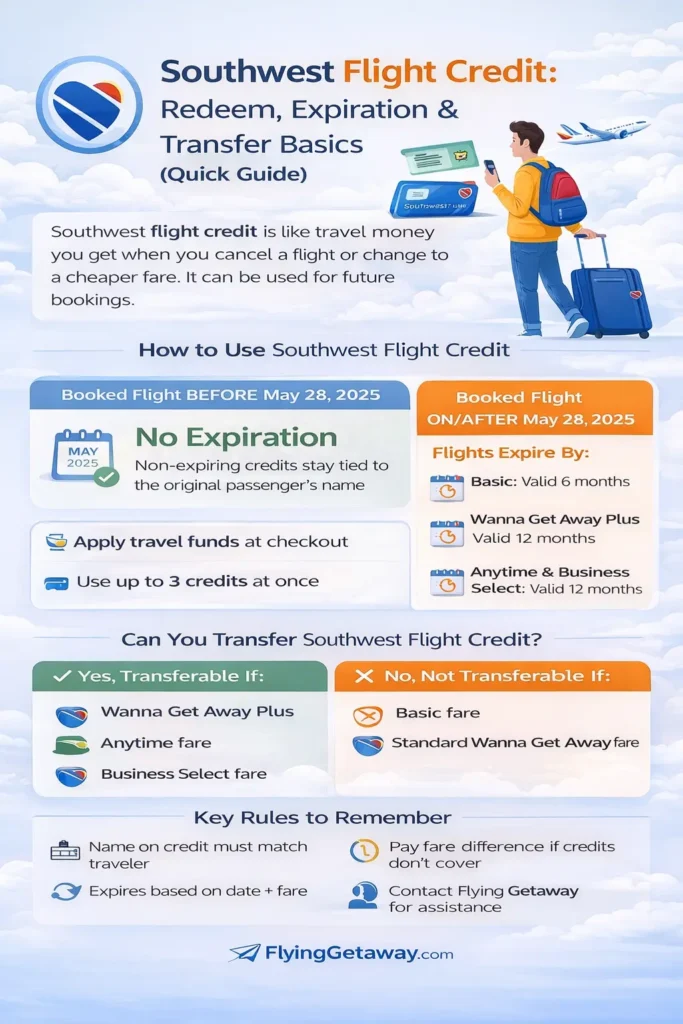
How to Use Southwest Flight Credit?
You can use credit when booking a new Southwest Airlines flight through the website or mobile app.
Steps to use your flight credit
- Visit Southwest.com or open the Southwest app.
- Search for your new flight.
- Continue to the payment page.
- Select Apply Travel Funds.
- Enter your confirmation number and passenger name.
- Your available credit will automatically reduce the total fare.
- Pay any remaining balance if your new fare costs more than your available credit.
If the total fare is higher than your available travel funds, you can pay the remaining balance using another accepted payment method.
If your new fare is lower than your available credit, any remaining eligible balance follows the current Southwest travel fund rules.
How do I transfer flight credit to Southwest?
Got flight credit you’re not planning to use? The good news is that you don’t have to let it go to waste. If it’s eligible, you can transfer it to someone else and help them fly instead.
🎫 Can all credits be transferred?
Only Southwest transferable flight credits can be shared, and those come from:
- Wanna Get Away Plus
- Anytime
- Business Select fares
So, if you’ve booked one of these and plans changed, you can pay it forward literally.
👥 Here’s how to transfer it (it’s easier than you think):
Log in to your Rapid Rewards account
- Go to “Travel Funds” under “My Account”
- Find the credit labeled “Transferable.”
- Click “Transfer fund,” and enter the recipient’s name and Rapid Rewards number
- Once the transfer is confirmed, the recipient becomes responsible for using the eligible travel credit before its original expiration date.
A few quick notes:
- Transfers are one-time only. Once it’s sent, it can’t be returned
- You can’t split one credit across multiple people
- Regular Wanna Get Away and Basic fares? Not transferable
💡Flying Tip: The person you're sending it to must be a Rapid Rewards member. And remember, credits don't get a new expiration date after transfer. They still expire when they originally were scheduled to.
👉Got a credit and not sure if it's transferable? Call Flying Getaway at our phone, and we'll help you send it off to the right person, stress-free. How to Avoid Losing Southwest Flight Credit?
To protect your travel value:
- Check the expiration date immediately.
- Save confirmation numbers.
- Link bookings to your Rapid Rewards account.
- Cancel before departure if you cannot fly.
- Use older credits first.
- Confirm whether the credit is transferable.
- Avoid waiting until the final week to redeem.
Final Thoughts
Southwest flight credit offers travelers flexibility when plans change, but understanding how travel funds work is essential to avoid losing their value.
Before booking your next flight:
- Check your available travel funds.
- Confirm the expiration date.
- Review transfer eligibility.
- Apply eligible credits during checkout.
Need help with Southwest flight credit, flight booking, or airline reservations?
📞 Contact Flying Getaway at [tfn].
Frequently Asked Questions
How do I use Southwest flight credit?
You can apply Southwest flight credit during checkout by selecting Apply Travel Funds and entering your confirmation number and passenger name. Eligible travel funds will automatically reduce the total cost of your new booking.
Does Southwest flight credit expire?
Yes. Some Southwest travel funds have expiration dates depending on the fare purchased and when the booking was canceled or changed. Always check your available travel funds before booking another flight.
How do I check my Southwest travel funds?
Log into your Rapid Rewards account and visit the Travel Funds section, or use the official Travel Funds lookup tool with your confirmation number and passenger name.
Can I transfer Southwest flight credit to another person?
Only eligible transferable flight credits may be transferred to another Rapid Rewards member. Standard travel funds usually remain associated with the original traveler.
Can Flying Getaway help me use Southwest flight credit?
Yes. Flying Getaway can assist with Southwest travel funds, flight booking, airline reservations, manage booking, and general booking support. Call +1 (646) 814-6001 for assistance.
Can I combine multiple Southwest flight credits?
Yes. Southwest generally allows eligible travel funds to be combined during checkout, subject to the airline’s current booking limits and fare rules.
Can I use Southwest flight credit to book flights for someone else?
Most Southwest flight credits can only be used by the original passenger. Only eligible transferable credits may be used by another Rapid Rewards member after a successful transfer.
What happens if I don’t use my Southwest travel funds before they expire?
Unused travel funds that expire may no longer be available for future bookings. Always check your expiration date and redeem eligible credits before they expire.
Sources
- Southwest Airlines Official Travel Funds Policy
- Southwest Rapid Rewards Program Terms
- U.S. Department of Transportation (DOT) consumer guidance
This guide is reviewed regularly to reflect current Southwest Airlines policies. Fare rules and travel fund eligibility may change, so always verify your booking details before making travel decisions.

Patrick Walker is the travel brain behind Flying Getaway. With a knack for spotting flight deals and a passion for exploring new skies, he helps travelers fly smarter and save more with every trip.